A library that keeps up
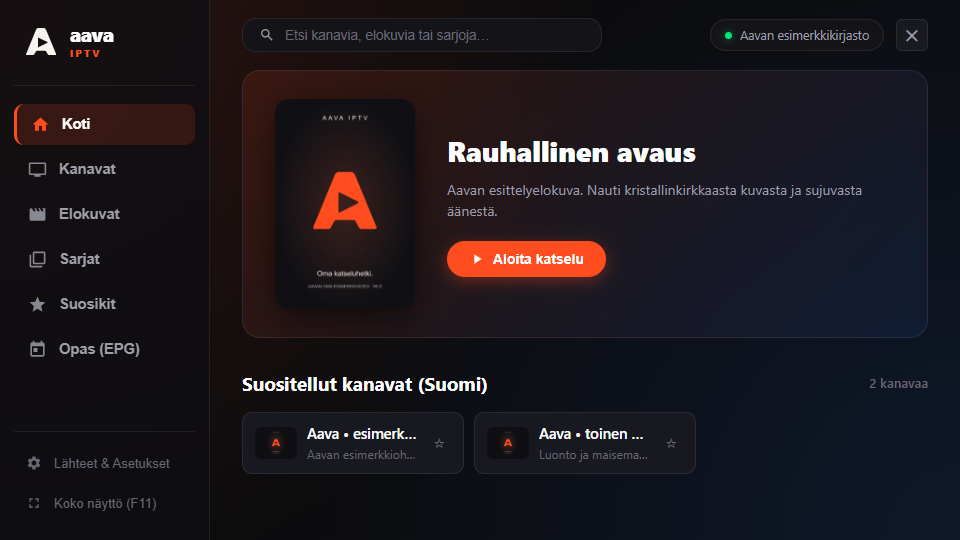
Browse channels by group, search movies and series, and save your favourites. Resume an unfinished movie from where you left off.

Aava IPTV · Taipale IT
Your channels, movies and series together in Aava. Connect your own IPTV service and find something to watch in a clean, dark library.
Windows preview available · Mac version in progress
Browser preview · requires your own source with HTTPS and CORS support.
Your content. Aava’s player. Aava does not include channels, movies or an IPTV subscription. You need your own Xtream Codes or M3U source and the right to access its content.
Included in the Windows version
Browse channels by group, search movies and series, and save your favourites. Resume an unfinished movie from where you left off.
Choose the stream’s audio and subtitle tracks. Import an SRT/VTT file or search OpenSubtitles using your own API key.
Keep watching in a picture-in-picture window above other windows, or go full screen. Pause, channel switching and picture fit are available in the player controls.
Aava on your computer
Get the app for your operating system or open Aava directly in your browser. Installers come from Aava’s GitHub releases.
Windows 10 (2004) / Windows 11 · x64
Download for WindowsVersion 0.4.5 · ZIP package
Extract the whole package into a folder and open Aava.exe. Microsoft Edge WebView2 Runtime is required. This preview does not yet have a Windows publisher signature.
Release notes and checksum ↗A dedicated native macOS app
The download will open when the tested package is ready.
The Mac version is being completed and tested on Mac. Its signed installer will be available here.
Computer, phone or tablet · no installation
Open in browserYour library, right in this tab
Add your own Xtream Codes or M3U source. The browser preview requires a service supporting HTTPS and CORS. Credentials stay in the open tab’s memory only.
Browser instructions and limits ↗The Windows guide is currently a channel list. AirPlay/Chromecast, multiview and profiles are not included in this Windows preview. See features and limitations ↗
Your first viewing session
Find setup, source and playback instructions on Aava’s support site.